
Golden Tests in Flutter: How We Test ASO.dev’s Adaptive Design
How ASO.dev tests its adaptive Flutter UI with ff_golden and publishes thousands of baseline PNGs using ff_golden_presenter.
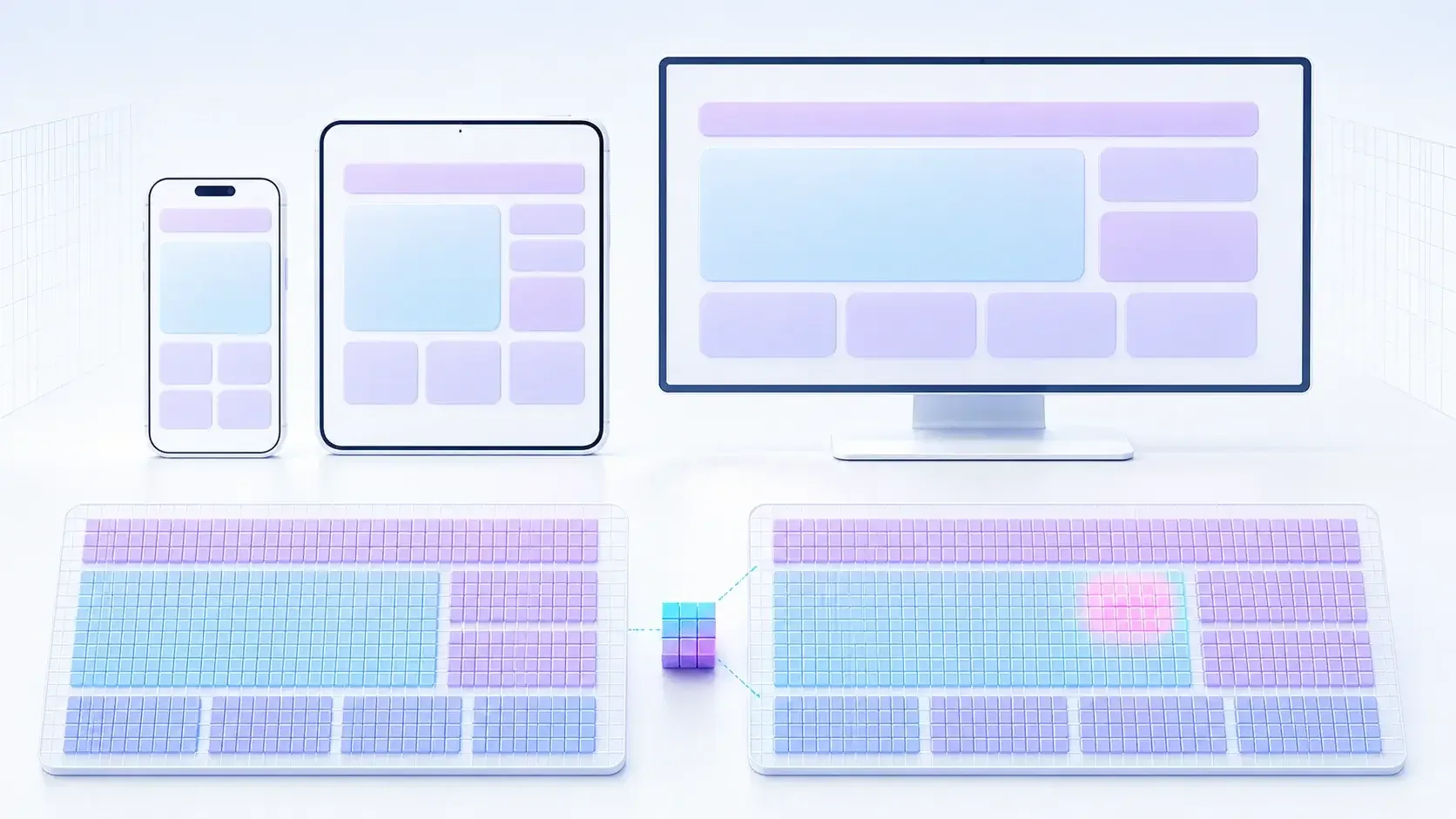

ASO.dev is a Flutter application for iOS, Android, macOS, Windows, and Linux. A shared codebase helps us ship on multiple platforms, but it does not make the interface adaptive on its own. A screen that looks good on a large monitor may not fit on a small phone. The light theme may look polished while a border disappears in dark mode. Translating a single button can turn one line into two and break an entire panel.
Manually checking all these combinations before every release is unrealistic. That is why golden tests are a cornerstone of our approach to UI quality.
What a golden test checks
Section titled “What a golden test checks”A golden test runs a Flutter widget in a controlled environment, renders it, and compares the resulting image with a baseline PNG in the repository. Flutter uses matchesGoldenFile for this: the default local comparator decodes the PNG and performs a pixel-by-pixel comparison.
A test has three possible outcomes:
- The image matches the baseline: there is no visual regression.
- The image differs: the test fails and saves artifacts for investigation.
- The change was intentional: a developer reviews the diff and only then updates the baseline.
That last point matters. Running flutter test --update-goldens does not fix a test. It simply declares the current result to be the new expected state. Updating images blindly quickly turns golden testing into an expensive formality.
From experience since 2022 to public packages
Section titled “From experience since 2022 to public packages”I have been using golden tests in Flutter since 2022, and they have been part of ASO.dev since the very first version of the application. Over the years, the test infrastructure has evolved alongside the product: we learned how to reliably check different screen sizes, themes, and data states, maintain thousands of baselines, and make changes easy to review.
We brought all that practical experience together in two public packages, whose first stable versions we released on August 29, 2026:
| Package | Role |
|---|---|
ff_golden 1.0.0 | Scenario execution, variant matrices, image capture, and comparison |
ff_golden_presenter 1.0.0 | Collecting copies, optimization, HTML reports, and publication |
Both tools are installed as project-local dev_dependencies, so their versions are locked alongside the application and resolved consistently on developer machines and in CI:
flutter pub add --dev 'ff_golden:^1.0.0'flutter pub add --dev 'ff_golden_presenter:^1.0.0'ff_golden models more than window size. A test variant can include a device and its devicePixelRatio, safe area, platform, theme, locale, text scale, text direction, brightness, and high contrast. Large matrices can use full, smoke, pairwise, or priority-based sampling with a hard limit on combinations. A scenario can change state and capture several named moments, while bounded virtual waiting helps avoid getting stuck on endless animations.
Strict mode remains the default: pixel-by-pixel comparison and detection of RenderFlex overflow, naming conflicts, and stale baselines. Deliberate local tolerance is possible, but it should not hide unexplained rendering differences. For CI, the package can also save JSON descriptions of planned variants, results, and failure artifacts.
Once we started building these packages, we got carried away with developer tooling and also created FF Git Image, an extension for VS Code. It lets us review image changes in Git right in the editor: compare versions side by side, overlay them, and highlight pixel differences. For golden tests, it is another convenient way to review updated baselines before committing them.
Our screen matrix
Section titled “Our screen matrix”A single baseline for one large window would give us a false sense of security. We built a shared test harness that runs each scenario across a matrix of devices, locales, and themes.
Our main matrix includes:
- iPhone 5S as one of the narrowest supported screens;
- iPhone 11 as a more modern phone;
- a tablet in portrait and landscape orientation;
- a Full HD desktop window;
- macOS Retina;
- light and dark themes.
English is the primary locale for most scenarios. Where text length or interface direction is particularly important, we add separate localized variants, including Russian. Error states usually need only a reduced phone-and-desktop matrix, while the most important loaded screens run through the full set.
A simplified test registration looks like this:
import 'package:ff_golden/ff_golden.dart';
testDeviceGoldens(  'loaded page',  (tester, device, locale, theme) => golden.builder(    tester,    device,    locale,    theme,    scenarioName: 'loaded',    scenario: (_) async => golden.waitUntilReady(),  ),  devices: GoldenTestDevices.bundle,  locales: GoldenTestDevices.locales,  themes: GoldenTestDevices.themes,);
ff_golden iterates over the combinations and produces separate Flutter tests and clearly named PNGs. The ASO.dev harness defines the supported bundles, the application’s root widget, and the setup for each state. Adding a new scenario therefore gives us an entire visual matrix, not just one check.
We test states, not just pages
Section titled “We test states, not just pages”A polished loaded screen is only part of the interface. In a real product, users encounter many more states:
- initial loading;
- empty data;
- a provider error;
- subscription or access restrictions;
- an open dialog, dropdown, or context menu;
- a table with the minimum and maximum sets of columns;
- selected filters, long values, and bulk actions.
For every important state, we prepare fixed data and a separate golden scenario. This catches not just obvious layout shifts but, for example, a button that disappears beneath a table only in the error state.
Mock data makes these checks convenient and reproducible. Instead of waiting for real APIs, test providers return the required response immediately. Every screen’s baseline test contract includes a loading state and several main data scenarios: an empty result, a typical set of records, boundary values, or restricted access. The same fixture is then checked at the required screen sizes, themes, and locales.
The need to write mocks also helps improve production code. To make a dependency replaceable in tests, access to APIs, storage, and other external systems needs to be separated from the UI through explicit contracts. Screen states become predictable, side effects become controllable, and large components are less likely to become silently coupled to the network or global state. The result is code that is easier to test, reuse, and change safely.
The matrix for our shared error screen is even broader. We aim to reproduce almost every type of error we encounter in practice: responses from App Store Connect and Google APIs, AI provider errors, network and SSL failures, platform services, and the ASO.dev backend. Some scenarios come from real Sentry incidents and are saved as fixed JSON fixtures. A golden test checks not only that an exception is handled, but also that users see a clear title, explanation, and action, and that a long message does not break the layout.
Determinism matters more than screenshot count
Section titled “Determinism matters more than screenshot count”A golden test is useful only when the same code consistently produces the same image. Otherwise, the team stops trusting failures.
In the test environment, we therefore:
- load the same fonts the application uses;
- replace networking, analytics, push notifications, authentication, and other external dependencies;
- use fixed dates and prepared provider responses;
- wait for a specific screen state instead of an arbitrary delay;
- pump a bounded number of frames after readiness to let animations finish;
- run checks on a pinned Flutter version in a consistent environment.
Readiness is especially important. An unbounded pumpAndSettle() can get stuck on a background animation, while a fixed delay can make tests slow and unreliable. For complex screens, we wait for something observable: data has loaded, the table has been created, or the required action has appeared. Then we give the interface a few frames to settle and capture the image.
Our development workflow
Section titled “Our development workflow”When changing the interface, we follow a simple sequence:
- Run the exact golden scenario for the affected screen.
- If it fails, inspect the baseline, the new render, and the isolated diff.
- Identify the cause: an expected change, a real regression, or an unstable test environment.
- Fix the code or update only the PNGs that genuinely need to change.
- Rerun the affected matrix, followed by a broader set of tests.
Flutter tests run automatically in GitLab CI. When images differ, the pipeline collects the failure images, masterImage, testImage, and isolatedDiff into a separate artifact. This makes it possible to investigate the difference even when the test did not run on the developer’s machine.
Local review with ff_golden_presenter diff
Section titled “Local review with ff_golden_presenter diff”Until now, we used a Git client to compare changed golden screenshots. While preparing this article, I realized that we could make this process much more convenient by bringing the separate actions together in one tool. That is how the diff command shipped in ff_golden_presenter 1.1.0:
fvm dart run ff_golden_presenter diffIt starts a local server available only through 127.0.0.1, with a browser UI for reviewing changed images. It lets you:
- browse all changed golden files and move between them;
- compare the baseline and working version side by side, highlight changed pixels, and adjust the highlight intensity;
- zoom and pan both versions in sync so that you can inspect the same area;
- stage and unstage files in the Git index, preparing the changes for a commit;
- run golden tests, view their logs, and separately copy either the full log or the errors;
- open related Dart test files directly from the interface.
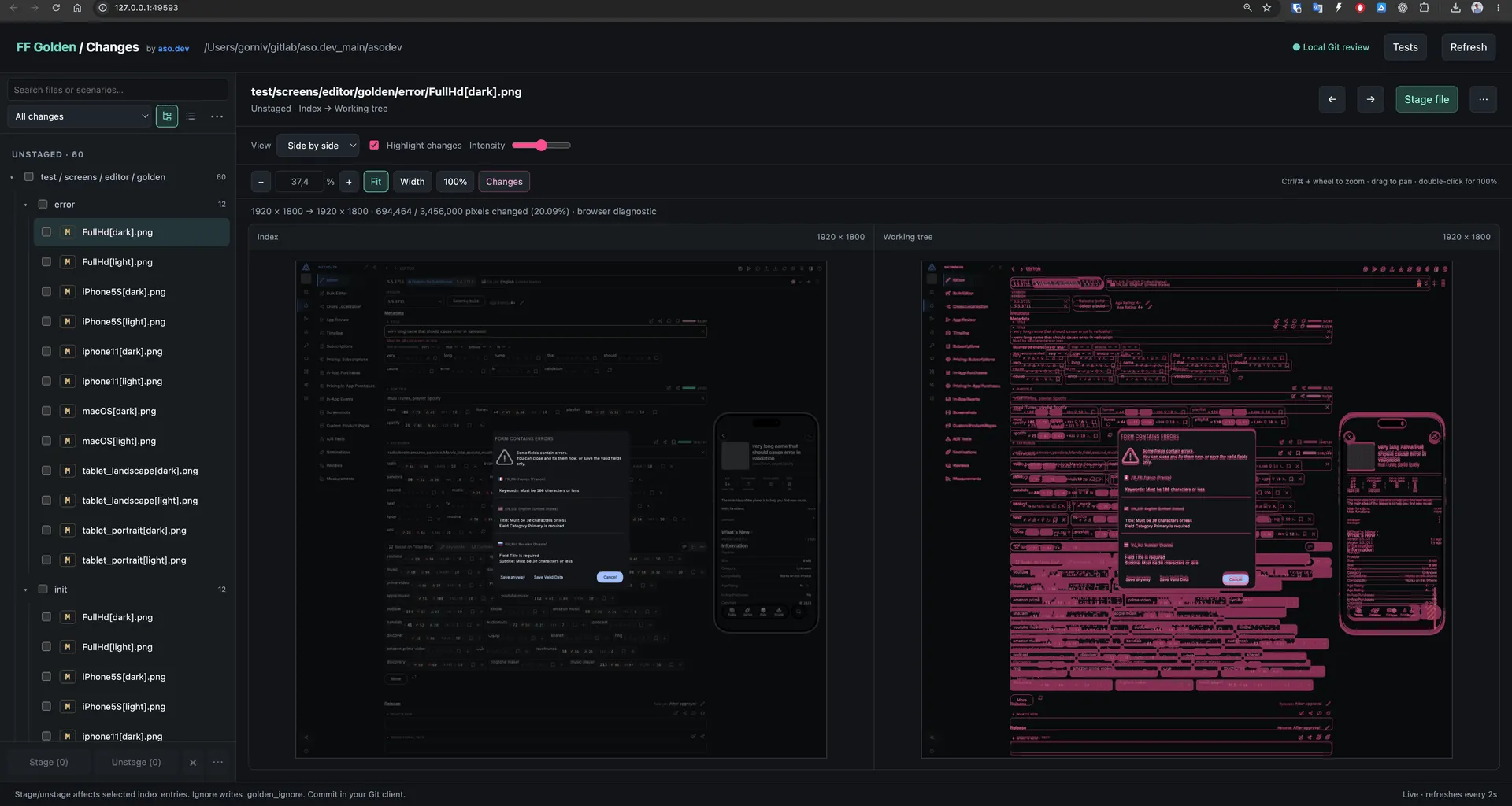
Review remains local and works with the actual state of the Git repository, but the main actions no longer require switching between a Git client, terminal, editor, and separate image viewer.
Why AI-assisted development starts with a golden test, not Computer Use
Section titled “Why AI-assisted development starts with a golden test, not Computer Use”When given a UI task, an AI agent often takes the most visual route: build the application, launch it, and interact with it through Computer Use by navigating screens, resizing windows, and taking screenshots. That is useful for a complete end-to-end scenario or native behavior checks. For a focused visual task, however, it is usually too broad a starting point.
To reproduce a single defect in a running application, an agent may need to:
- wait for the target platform to build and launch;
- authenticate and navigate through the application;
- prepare data or wait for an external service;
- manually set the window to the required size;
- open the exact screen state;
- visually compare a new screenshot with the expected result.
Every step adds time and another variable. The result depends on the account state, network, window size, data, and capture timing. Repeating the check exactly is harder, while images and long sequences of actions increase the cost of running the AI agent.
A focused golden test starts directly in the required state:
| Computer Use | A case-specific golden test |
|---|---|
| Launches the entire application | Renders only the required screen or component |
| Depends on navigation, account state, and data | Uses fixed fixtures and DI overrides |
| Requires manual reproduction of window size and capture timing | Defines the device, devicePixelRatio, theme, and locale in the test |
| Relies on an agent or person to assess differences | Uses Flutter to produce a reproducible pixel-by-pixel diff |
| Is difficult to repeat without the same sequence of actions | Runs the same test locally and in CI |
At ASO.dev, we therefore direct the AI agent first to the actual widget and state-handling code, then to a named golden scenario that reproduces the specific issue. If a table overflows by one pixel on a narrow screen, for example, we do not need to launch the application and assemble that state manually. The agent changes the smallest relevant part of the layout, runs one scenario on the required device, and checks the PNG. We can then run the full matrix to confirm that the fix has not broken other sizes or themes.
This loop is usually faster, less expensive, and, most importantly, repeatable. It leaves a reviewable artifact in the repository and can run again after any future change. Computer Use remains the next tool when a question cannot be expressed as a widget test: a native dialog, a platform channel, window behavior, system drag-and-drop, or a complete user journey.
How we show all the golden screens
Section titled “How we show all the golden screens”The local diff covers day-to-day review of changed baselines: it lets developers compare before-and-after images, understand what changed, and decide what needs fixing in the interface and where a baseline should be deliberately updated.
Other team members may find it more useful to see what the application already contains as a whole: which screens and states have been implemented, and how they look on different devices and in different themes. We build a gallery for this overview using ff_golden_presenter.
For ASO.dev, this is primarily a public showcase of the interface rather than a day-to-day developer tool. You can explore it at golden.aso.dev.
The demo publication flow looks like this:
test/screens/**/*.png → ff_golden_presenter build → goldens/index.html + optimized copies → nginx → golden.aso.dev
Previously, a project shell script found the PNGs, copied directories, checked for pngquant, compressed files, and called a globally installed presenter. The entire local pipeline is now expressed in a single project command:
fvm dart run ff_golden_presenter build \ --input test/screens \ --output-directory goldens \ --report-file index.html \ --profile balanced \ --clean \ --title "ASO.dev Golden Tests"In this example, build copies the baselines from test/screens into a separate goldens directory and optimizes only those copies. The source PNGs used for test comparisons remain untouched.
The balanced profile uses pngquant and can fall back to ImageMagick if it is unavailable. Before building the gallery, you can check whether a suitable tool is installed:
fvm dart run ff_golden_presenter doctor --profile balancedIf compression is unnecessary, choose the none profile. The gallery is still generated, but image copies remain byte-for-byte identical to their sources, and no external optimizers are required:
fvm dart run ff_golden_presenter build \ --input test/screens \ --output-directory goldens \ --profile none \ --cleanFailed tests leave diagnostic comparison images in failures directories. The separate clean-failures command cleans them up. First, preview which files it would delete without changing anything on disk:
fvm dart run ff_golden_presenter clean-failures \ --input test/screens \ --dry-runIf the list is correct, repeat the command without --dry-run:
fvm dart run ff_golden_presenter clean-failures --input test/screensBy default, only PNGs inside directories named failures are deleted. Baselines outside those directories and other diagnostic files are preserved.
The resulting HTML has no runtime dependencies. It includes search, variant filters, scenario navigation, light and dark themes, responsive cards, and a keyboard-accessible lightbox. If ff_golden saved JSON manifests, the presenter adds exact capture, device, theme, locale, text-scale, status, duration, and error data. GitLab CI then packages the completed directory into an nginx image, and a separate deployment job publishes it at golden.aso.dev.
Publishing can quickly consume bandwidth
Section titled “Publishing can quickly consume bandwidth”A golden gallery consists of static files, but serving them is not necessarily free. Even after optimization, a large set of screens can take up hundreds of megabytes.
For scale, as of August 31, 2026, the test/screens directory used to build the ASO.dev gallery contains 1,996 PNGs totaling approximately 357 MB. These are the source baselines before optimization, not the size of a single page load. The size of the published copies depends on the optimization profile, while traffic depends on how many images visitors actually load.
For example, Firebase Hosting includes up to 10 GB of storage and 10 GB of data transfer per project per month at no cost. Transfer includes both cache misses and responses from the CDN cache, while files in retained releases count toward Hosting storage. Active browsing of a large report or frequent publications can therefore quickly bring a project close to its free limits. On the Spark plan, exceeding the transfer allowance disables sites after a short grace period until the start of the next month.
Firebase can work for a small demo or a private report that is opened infrequently, but storage, transfer, and retained releases need monitoring. For our large catalog, we chose static hosting on our own infrastructure: CI builds goldens/, packages the directory in a Docker image with nginx, and deploys it as golden.aso.dev. Docker does not eliminate network traffic, but it keeps that traffic outside Firebase’s quota and lets us manage storage, caching, and access ourselves.
The roles are still distinct: ff_golden runs scenarios and performs baseline comparisons. ff_golden_presenter provides the local review UI and builds the catalog used to browse and publish the interface. The diff command can launch project tests, but it does not replace the golden-comparison mechanism itself.
The bugs we catch
Section titled “The bugs we catch”Golden tests are particularly good at catching small but costly product defects:
RenderFlex overflowby one or more pixels;- clipped text and incorrect line wrapping;
- broken adaptive breakpoints between mobile and desktop layouts;
- a disappearing button or column;
- incorrect spacing after reusing a shared component;
- differences between light and dark themes;
- portrait and landscape issues;
- accidental changes to fonts, icons, or table density.
A person can easily miss a one-pixel shift on a familiar screen. A pixel-by-pixel comparison does not. The test also shows the problem at the exact size where it occurs.
What golden tests do not guarantee
Section titled “What golden tests do not guarantee”A golden test is a widget test in a controlled environment, not a photograph of every physical device. It checks Flutter’s shared rendering path at a given size, theme, and locale, but does not replace:
- unit tests for business logic;
- widget tests for interactions and accessibility;
- integration tests for complete scenarios;
- checks of native APIs and platform channels;
- performance profiling;
- manual verification of a critical release scenario on a real device.
We treat golden testing as one layer of our quality strategy. This also follows Flutter’s recommendations: a foundation of many unit and widget tests, complemented by integration tests for important user journeys.
The cost: a growing repository
Section titled “The cost: a growing repository”The main downside did not appear immediately. PNG is a binary format. When a baseline changes, Git cannot store a visual diff as efficiently as a few changed lines of Dart code: a new binary object enters the history.
As of August 30, 2026, our working tree contains:
- 2,031 test PNGs;
- approximately 348 MB of images in their current versions;
- approximately 3.6 GB in the application’s local
.gitdirectory.
Not all of .git comes from golden tests: a large cross-platform application has plenty of other binary resources. But thousands of screenshots and their previous versions account for a noticeable share of the growth.
After roughly three years of development, we had to move active development into a new GitLab repository to stay on the free plan. A migration like this restores headroom, but it is not a long-term storage architecture by itself. History needs to be moved or linked, and CI/CD, permissions, variables, integrations, and every team member’s local remotes need to be checked. We did it because, at that stage, a separate migration was simpler than redesigning an already working golden-testing setup.
Where to store baselines
Section titled “Where to store baselines”Each option has its trade-offs.
| Approach | Advantages | Disadvantages |
|---|---|---|
| PNGs in the main repository | The simplest checkout, one commit, and convenient review | Growing clone/fetch size and repository history |
| Git LFS in the same project | The main Git repository stores small pointer files; binaries are downloaded separately | Requires an LFS client; repository and LFS storage share the GitLab project quota |
| A separate repository as a submodule | Separate histories and quotas; the main repository records the exact baseline commit | Two repositories, extra authentication and CI setup, and coordinated updates |
| Object storage or CI artifacts | The code repository barely grows | Requires your own versioning, retention policy, and visual review interface |
Git LFS does make large binary files easier to manage: Git stores a text pointer instead of the PNG. On GitLab, however, Git repository and LFS storage count together toward the project limit. LFS therefore improves clone/fetch behavior, but does not provide unlimited free storage.
Is a Git submodule a good fit?
Section titled “Is a Git submodule a good fit?”Yes, if the goal is specifically to separate baseline image history from source code history while keeping an exact link between their versions.
A submodule is a separate repository inside the working tree. The main project records the path, URL, and commit that the screenshots must use. This provides a useful property: each application commit points to an exact set of baselines, but older PNGs no longer inflate the main repository’s history.
On GitLab Free, this also provides a separate storage project. As of August 2026, GitLab.com provides 10 GiB per project in a free namespace. If only recent image history is needed locally and in CI, the submodule can be cloned with limited depth.
But a submodule carries workflow costs:
- a regular clone does not always fetch it automatically;
- CI must be able to access a second private repository;
- new PNGs must be committed to the submodule before updating the reference in the main project;
- the code merge request and visual diff are split across two projects;
- developers must ensure that their local submodule is at the expected commit.
It is therefore not unconditionally the simplest solution. Keeping a PNG next to its test is easier day to day. But among approaches that genuinely separate binary history while retaining Git-based versioning, a separate repository with a submodule is one of the most direct and understandable options.
If we were designing storage from scratch, we would seriously consider this structure from the beginning. Moving thousands of existing files and their history into it without interrupting active development is a separate engineering task. So far, periodic migration has been the more pragmatic option for us.
Conclusion
Section titled “Conclusion”Golden tests do not automatically make an interface good. They make visual decisions reproducible: the same page, state, theme, locale, and screen geometry should produce the same result.
For the cross-platform ASO.dev application, this has become a way to ship adaptive design without manually reviewing hundreds of combinations. That testing workflow is now available to other Flutter teams through ff_golden, with visual browsing and publication provided by ff_golden_presenter. We pay for it in test execution time, fixture maintenance, and storage growth. So far, that cost is lower than the cost of visual regressions found by users after release.