
TestFlight testing information
The Testing Information page stores the app-level information used by TestFlight.
Use it to prepare the public beta app details testers can see, provide Beta App Review contact details and sign-in information, localize testing copy, and keep review notes clear before submitting builds.
When to Use It
Section titled “When to Use It”Use this page when you need to:
- update the beta app description shown for TestFlight;
- set feedback, marketing, privacy policy, tvOS privacy policy, and license agreement URLs;
- provide contact details for Beta App Review;
- specify whether sign-in is required and provide test credentials;
- write Review Notes for Apple;
- add or edit localized testing information;
- translate fields from the base locale into all localizations;
- use AI to turn rough notes into professional English text.
App Info
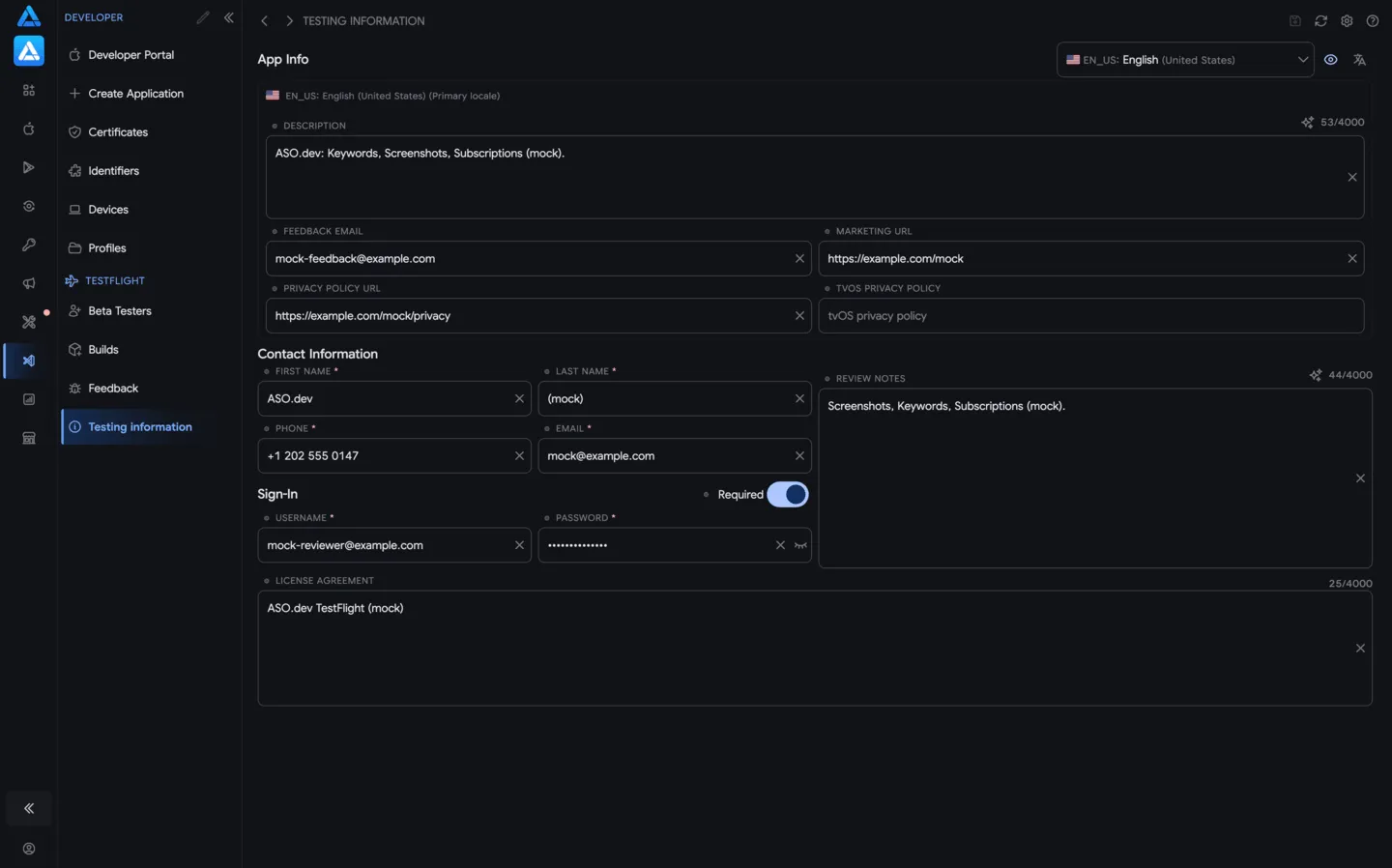
Section titled “App Info”The App Info section contains localized information attached to the TestFlight app.
Fields can include:
- Description - the beta app description. Use it to explain the product, testing scope, account requirements, and important caveats.
- Feedback Email - the address testers or Apple can use for beta feedback.
- Marketing URL - an optional product or company page.
- Privacy Policy URL - the privacy policy testers should read.
- tvOS Privacy Policy - a tvOS-specific privacy policy when the app supports tvOS.
- License Agreement - terms or license agreement URL/text.
Character counters show Apple limits for long text fields. Clear icons remove field values before saving.
Contact Information
Section titled “Contact Information”Contact information is used for Beta App Review.
Keep it accurate so Apple can use the submitted contact details if the build needs clarification.
Typical fields:
- first name and last name;
- phone number;
- email address;
- Review Notes.
Review Notes should tell Apple how to access and test the beta build. Include test accounts, required data, feature flags, regions, payment instructions, or anything that prevents review from getting blocked.
Sign-In
Section titled “Sign-In”If the beta build requires authentication, enable Required and provide test credentials.
ASO.dev stores:
- username;
- password;
- whether sign-in is required.
Use credentials that work for Apple review and do not depend on personal employee accounts. The password field can be hidden or revealed while editing.
Localizations
Section titled “Localizations”The locale selector controls which localization you are editing.
Helpful actions:
- Add localization - adds another language for beta testing information.
- Show localizations and Hide localizations - expand or collapse all localized fields.
- Translate - translates the base locale into the other localizations for that field.
- Save - writes changed information to App Store Connect.
- Reload - loads the latest App Store Connect values.
Use the primary locale as the source of truth, then translate into the localizations needed for the beta audience.
AI Rewrite
Section titled “AI Rewrite”The sparkles button improves Apple-facing text such as Review Notes.
You can write rough text in any language and ask ASO.dev to turn it into clear professional English. For example, a messy note can become three polished variants with a better tone and structure.
AI prompts can be customized, so the generated copy can match your team’s review style, include required sections, or avoid phrases you do not want to send to Apple.
Practical Workflow
Section titled “Practical Workflow”Prepare Beta Review Information
Section titled “Prepare Beta Review Information”- Select the primary locale.
- Fill in the beta app description and URLs.
- Add contact information.
- Enable sign-in if the app requires an account.
- Add working test credentials.
- Write or generate Review Notes with .
- Save changes before submitting a build to Beta App Review.
Localize Testing Information
Section titled “Localize Testing Information”- Add the needed localizations.
- Edit the base locale first.
- Use Translate to fill localized fields.
- Review required fields and character counters.
- Save.
Permissions and Limits
Section titled “Permissions and Limits”Reading testing information requires App Store Connect API access for the selected app.
Saving changes requires write permission in ASO.dev and the matching App Store Connect role.
Important limits:
- Apple controls required fields and character limits;
- Review Notes are intended for Apple, not general tester marketing copy;
- localized values should be saved before switching apps or reloading;
- sign-in credentials should be stable test accounts prepared for review.